

Written by Allen Wyatt (last updated November 21, 2019)
This tip applies to Word 97, 2000, 2002, and 2003
While Microsoft Graph allows you to develop full-color charts, you may want to orient them more toward black-and-white if they will appear in a black-and-white document. Similarly, you may wish to play with patterns and colors to get the most from printing on your color printer. Toward this end, the program allows you to specify patterns to use for different portions of your chart. These patterns are primarily used to differentiate data series (rows in your spreadsheet) from each other. To change the pattern assigned to a data series, follow these steps:
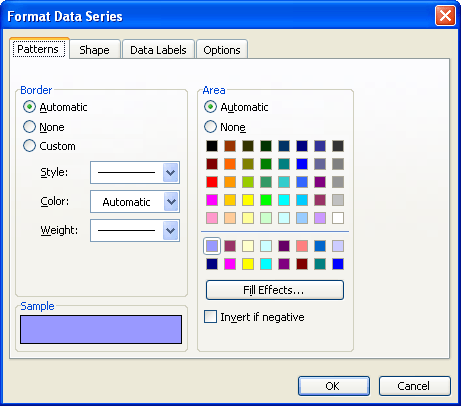
Figure 1. The Patterns tab of the Format Data Series dialog box.
WordTips is your source for cost-effective Microsoft Word training. (Microsoft Word is the most popular word processing software in the world.) This tip (687) applies to Microsoft Word 97, 2000, 2002, and 2003.
The First and Last Word on Word! Bestselling For Dummies author Dan Gookin puts his usual fun and friendly candor back to work to show you how to navigate Word 2019. Spend more time working and less time trying to figure it all out! Check out Word 2019 For Dummies today!
Microsoft Graph is a simplistic graphic tool that you can use to quickly add graphs to your document. Here's how to start ...
Discover MoreIf you don't have Excel installed on your system, Microsoft Graph is a handy way to create simple charts for your ...
Discover MoreMicrosoft Graph is a handy way to add charts to your document if you don't have access to Excel. Here's how to adjust the ...
Discover MoreFREE SERVICE: Get tips like this every week in WordTips, a free productivity newsletter. Enter your address and click "Subscribe."
2019-10-10 06:08:39
sampada Koli
want to apply pattern to charts in microsoft word 2007. Is any add ins available?
Got a version of Word that uses the menu interface (Word 97, Word 2000, Word 2002, or Word 2003)? This site is for you! If you use a later version of Word, visit our WordTips site focusing on the ribbon interface.
Visit the WordTips channel on YouTube

FREE SERVICE: Get tips like this every week in WordTips, a free productivity newsletter. Enter your address and click "Subscribe."
Copyright © 2025 Sharon Parq Associates, Inc.
Comments